Passless began as a course project: a Python/Flask service that replaces a password ceremony with WebAuthn. The login button is easy to photograph. The interesting part is deciding what its success actually proves.
There is a real browser implementation here, not a drawing of a hypothetical product. There is also an important unfinished boundary: the reviewed prototype does not adequately require existing account ownership before allowing an additional passkey to be enrolled. I keep it here as coursework and a learning record, not as a production authentication service.
A public key is not a password hash
A password-based service normally stores a salted password verifier rather than the password itself. If that verifier is stolen, an attacker may be able to make offline guesses. The hashing scheme and the password’s entropy determine how expensive those guesses are.
WebAuthn changes the credential relationship. The relying party—the service asking you to authenticate—stores a credential identifier and public key. The authenticator holds the corresponding signing capability. Knowing the public key is not enough to produce a valid signature.
That does not make the database harmless to disclose. It still contains account identifiers and credential metadata. Nor does it make the whole server secret-free: this Flask application uses a session-signing secret, and the session created after authentication still needs protection.
The earlier pitch, “nothing worth stealing,” was too broad. A narrower and more useful claim is that the relying party does not need a reusable password or the passkey’s private signing key.
The credential record, field by field
The original captured database example contained a 77-byte COSE EC2 P-256 public key and a signature counter of 2. Those are observations from that test credential, not required sizes or counts for every authenticator.
| Stored item | Why it exists | What it does not establish |
|---|---|---|
| User and credential identifiers | Associate a credential with an application account | That the person adding it is authorized to control that account |
| COSE-encoded public key | Verify signatures using the credential’s algorithm and key material | Possession of the private key by the server |
| Signature counter | Compare supported counter behaviour with prior assertions | Universal detection of copied or synced credentials |
| Device type, backup state and transports | Record credential properties and connection hints | A physical-device security certification |
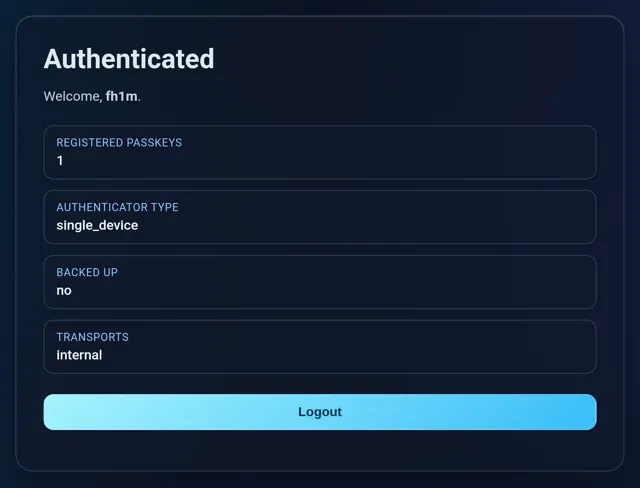
The dashboard’s “registered passkeys” number counts credentials. It is not the signature counter. Similarly, internal is a transport classification; it does not tell a remote reader which person, PIN or biometric was involved.
Registration and authentication are different ceremonies
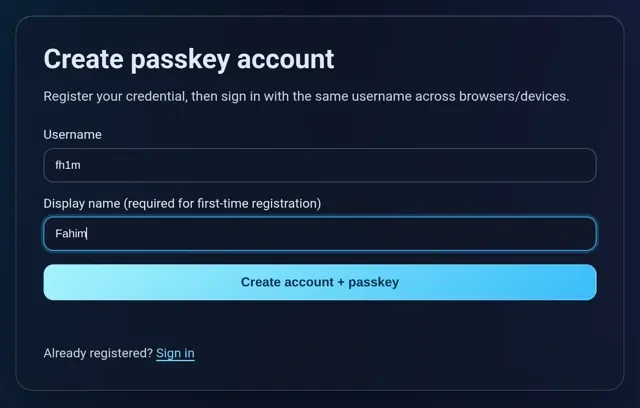
During registration, the browser asks an authenticator to create a credential for the relying party. The server verifies the response and stores the resulting public-key credential. Passless requests user verification and uses the none attestation preference; it is not asking for a manufacturer-backed attestation chain to certify a particular hardware model.
During authentication, the server issues a fresh challenge and identifies which existing credentials it will accept. The browser asks an authenticator for an assertion, and the server verifies it against the public key already associated with the account.
The distinction is the heart of this project’s review. A valid new credential can demonstrate a successful registration ceremony. It does not, by itself, prove permission to attach that credential to somebody’s existing account.
What actually gets signed
The shorthand “sign the challenge” skips the binding that makes this interesting.
The browser constructs clientDataJSON, including the ceremony type, challenge and origin. The authenticator produces authenticatorData, which includes the relying-party ID hash, flags and signature counter. For an authentication assertion, the signed bytes are:
authenticatorData || SHA-256(clientDataJSON)The server needs the original client-data bytes when checking that hash. Rebuilding a roughly equivalent JSON object is not the same operation: signatures bind bytes, not the meaning a reader assigns to them.
Checks that are not interchangeable
The reviewed Flask routes delegate the WebAuthn response checks to the Python webauthn library. They supply the expected challenge, allowed origin, effective RP ID, user-verification requirement, stored public key and prior counter.
Each value has a different purpose:
- Challenge and ceremony type: the response must belong to the expected operation, rather than being an old response or a registration object used as a login assertion.
- Origin: the signed client data must describe an origin the service expects. This is not just trusting an arbitrary HTTP header.
- RP ID hash: the authenticator data must be scoped to the intended relying party.
- Presence and verification flags: a touch or other presence signal is not the same requirement as local user verification. Passless explicitly requires verification.
- Credential association: the credential found by ID must belong to the username being authenticated.
- Signature: the supplied assertion must verify under that credential’s stored public key.
The database stores expiring challenges by username and ceremony type and consumes them when verification is attempted. A challenge’s server-side lifetime is separate from the browser’s prompt timeout. Freshness, origin binding and account association cannot substitute for one another.
Nor should the page say “a biometric proves it is you.” A relying party receives the verification result, not a biometric template. In the browser tests shown here, the authenticator is simulated and reports its verification flags programmatically.
The counter is a signal, not a clone oracle
The test credential’s counter increased. That is useful evidence about that credential in that run.
The WebAuthn counter guidance is more careful than the original project pitch. If either the old or new counter is nonzero and the new value does not exceed the old one, a clone may exist—or the authenticator may be malfunctioning. A mismatch does not identify which copy produced the response.
The verifier used in this review follows that conditional rule. It does not require every credential to maintain a nonzero increasing counter. Challenge freshness is still necessary; the counter is not the only replay defence.
Passkeys also are not all permanently tied to one physical device. FIDO distinguishes device-bound and synced passkeys. The relying party does not receive the private signing key in either ceremony, but saying “the secret never leaves your device” is too broad for the synced case.
The application boundary the prototype missed
The important remaining flaw is in permission to enroll, not a broken signature primitive. In the reviewed source, an additional credential can be associated with an existing account without adequately establishing the existing owner’s authorization.
That is why a working registration screen and a valid cryptographic response cannot be the entire security argument. The service must decide who is entitled to add or replace a credential, not merely whether the newly supplied credential is well formed.
This limitation was checked in a disposable localhost instance with synthetic accounts and separate virtual authenticators. The existing automated suite passed, while the additional account-ownership scenario exposed the gap. No live account or production service was involved.
The application code remains unchanged for this website pass. This is a bounded account of the prototype at the inspected revision, not a deployment recommendation or an exploit walkthrough.
A signature can be valid while the account decision is wrong.
Localhost, tunnels and the name of the service
The project supports localhost, local HTTPS and temporary HTTPS tunnels for testing across devices. That exposes another piece of the model: the credential is scoped to a relying-party ID, not merely to the Python process listening behind it.
An origin includes scheme, host and port. An RP ID is a domain identifier. A credential created for one temporary tunnel hostname is not automatically available to an unrelated hostname allocated on the next run. A stable test hostname avoids confusing “the same backend” with “the same relying party.”
Those modes are useful development tools, not a production runbook I would endorse with the enrollment boundary unresolved. Session handling, authorized credential changes, recovery, revocation and deployment policy remain part of the system even after password storage disappears.
What I keep from it
The useful result is a ceremony I can inspect end to end, plus a clearer distinction between cryptographic verification and application authorization. That distinction also appears in the terminal chat: encrypted bytes do not automatically establish who is on the other end.
The source and assignment report preserve what was built. The screenshots preserve the original working interface. This later reading keeps their limits visible rather than letting a successful-looking dashboard do all the talking.
For further reading, start with the WebAuthn Level 2 specification, especially assertion verification and counter considerations, and FIDO’s passkey explanation. Compare those responsibilities with the actual Flask routes instead of treating a library call as the whole account system.